Case study #2: we ran our own app through AppBro, and it found 12 problems before a customer could
AppBro sets up the pages an app needs for store review. Before asking anyone else to trust it, we used it for iPaid iOwe, an app of ours that is already in the stores. Here's what worked in under a minute, the 12 things that broke, and what we still haven't tested.
The second form test went badly in a useful way. We filled in the delete-account form on the new site, pressed send, saw "request received", and pressed reload. A second deletion request arrived, with a second email. Any real user with a nervous thumb would have done the same, and the developer on the other end would have had two requests to answer for one person.
That was problem number two of twelve. This is the story of all twelve, because the product they were found in is ours.
The brief
AppBro does one narrow job. Before an app can go into the App Store or Google Play, the store forms ask for a privacy policy URL, a support URL and, if the app has accounts, a page where people can ask for their account to be deleted. AppBro drafts those pages from one form and puts them online with HTTPS. We wrote about why that job exists in an earlier guide.
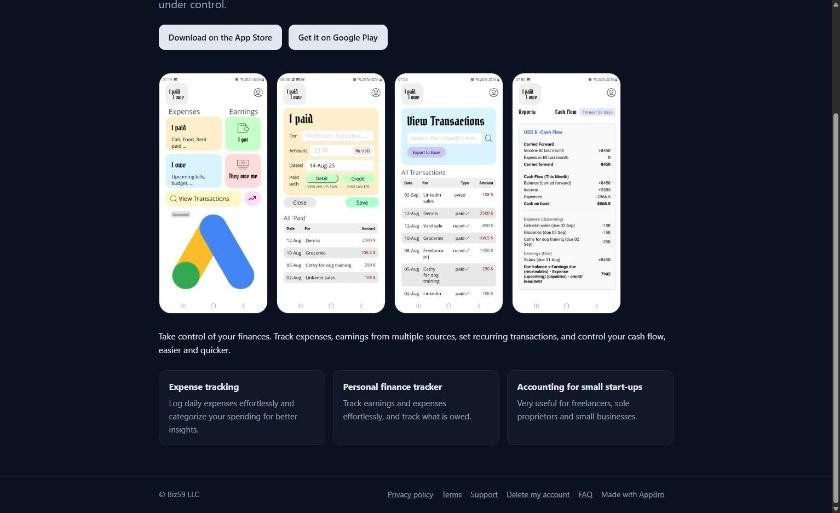
The customer in this case study is us. iPaid iOwe (ipio for short) is a personal finance app we made: what you paid, what you owe, repeating bills, cash flow. It's already in the stores, and its policy pages were hand-written and living on an older site. The brief was one line: build everything ipio needs through AppBro, as a stranger would, and stop to fix whatever breaks.
We'd rather publish that than a customer quote. A small product nobody has used hard yet shouldn't pretend otherwise.
What worked: one form, then under a minute
The form has four steps: the app, what it collects and where its users are, the address, a review. Step two is the one that matters, because every tick changes the policy text.
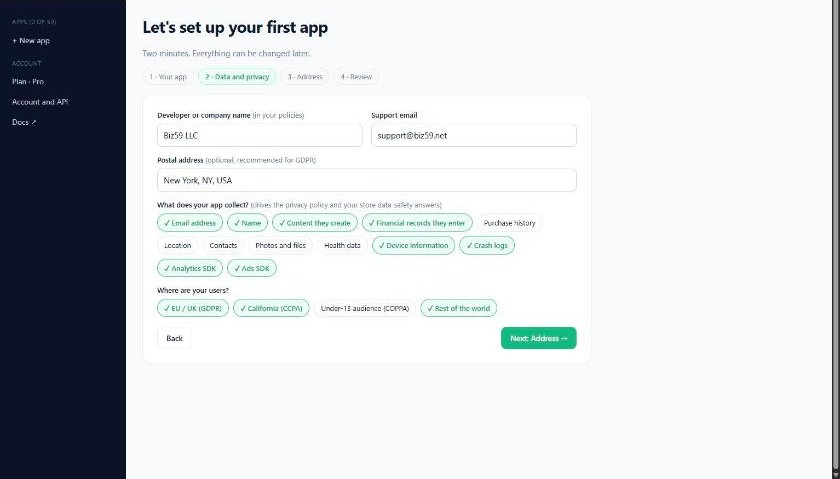
We pressed "Set it all up" at 13:58:22. Three seconds later the pages were drafted. At 13:59:13, 51 seconds after the button, the new address had its HTTPS certificate. On the first run the day before it took about 25 seconds, and 62 for a second test app. So: under a minute, most of it waiting for the certificate.
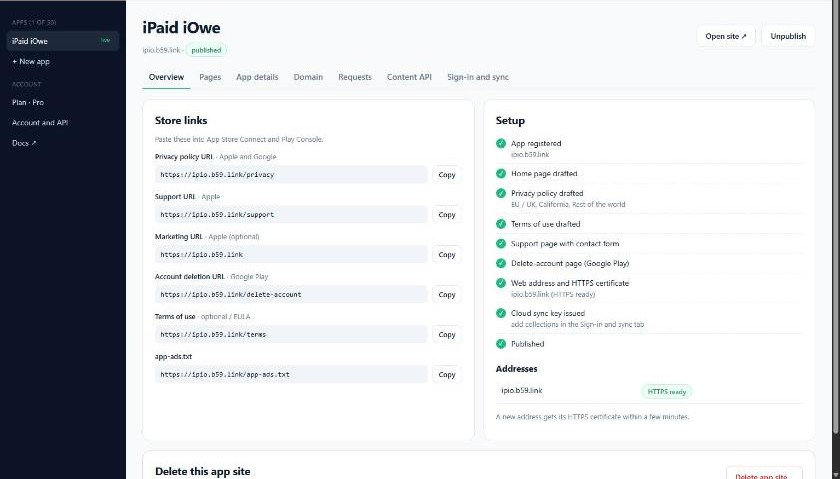
What came out: a home page, a privacy policy in nine sections, terms of use, a support form, a delete-account form, an app-ads.txt file and an FAQ page. All of it answers on a phone-width screen without sideways scrolling. You can look at the result: ipio.b59.link.
What broke: twelve problems on day one
We stopped twice to fix and deploy, then started again from the top. All twelve are fixed and live. These are the ones a developer would have hit in the first hour.
Screenshots uploaded after set-up never reached the home page. The form has no upload step, so everyone adds images afterwards, and the home page stayed as it was first drafted. It now follows your details and images until you edit it by hand.
Reloading "request received" sent the request again. The one from the top of this article. Forms now redirect after sending, so a reload is only a reload.
A mistyped email wiped the form. The error replaced everything the person had written. It now shows above the form, with their text still in it.
Saving a custom domain broke every store link. This is the one that could have cost somebody a store review. The moment a domain was saved, the privacy, support and deletion links switched to it, even if its DNS pointed nowhere yet. A reviewer opening the privacy link in that window would have found nothing. The links now stay on the working address until the new domain answers over HTTPS.
The page editor allowed too much styling. Inline styles could draw a full-screen overlay or load a remote image on an address we host. Styles are now limited to plain text and box properties.
The policy claimed something that wasn't true. For accounts with cloud sync available, the privacy policy always said data is stored in sync, even when the app didn't use it. Wrong for ipio. Sync is now named only when the app really syncs something.
The form had no word for what ipio stores. A finance app keeps financial records, and Google Play's data safety form has a category for exactly that. Ours didn't. Two choices were added: financial records and device information.
The other five were smaller: feature cards that could hold a title but no sentence, extra pages nobody could reach because nothing linked to them, a store link typed without https:// failing at the last step with a programmer's error message, a four-step form shown to someone whose plan had no room for another app, and a warning written into our server log on every run.
None of these showed up in the test suite. It had 16 passing tests before the run and 20 after, the four new ones written from what broke.
Then we deleted it and did it again
A run-through that ends with a working site proves less than it seems to, because you've been patching as you go. So the same day we deleted ipio's site and set it up again from nothing, capturing every screen from the live console.
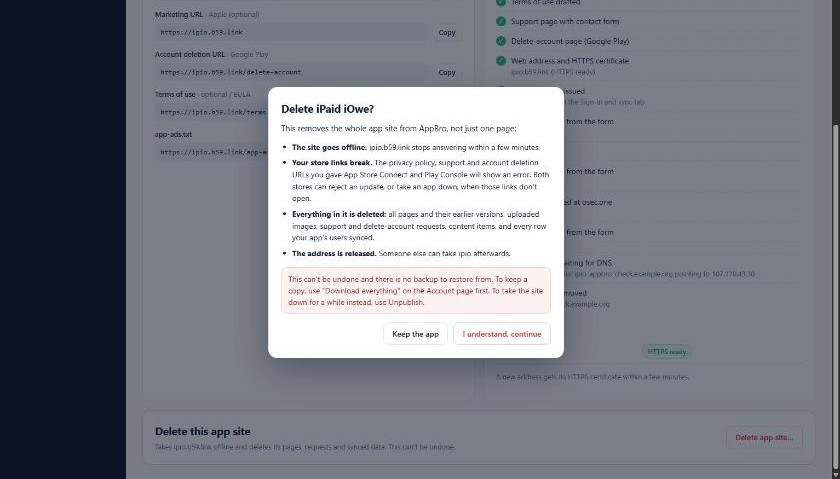
Delete first. We checked on the server afterwards instead of believing the screen: the pages, requests, images and the web server's file for that address were gone, and the address stopped answering. If an app's site promises people their data can be removed, the developer's own data should go just as completely.
The second pass was cleaner, and still found four more things, all in the part where an app's users see their own synced data: record ids listed before the readable fields, a page that opened on the smallest table, sizes under a megabyte shown as "0 MB", and a status line that said sign-in was being registered when it was simply off. Fixed the same day; the suite stands at 38 tests.
What we haven't tested, and what's still open
No real payment has gone through. The paid plan's checkout was not pressed in these runs. It is covered by automated tests only, and we'll say so until a real card has been through it.
ipio's store listings still point at the old pages. The drafted policy is general. Next to the hand-written one it says the app isn't for children under 13 where ours says under 18, and it has no clause for what happens to data if the business is sold. Both need a human read before the listings change. That's the honest limit of any drafted policy: it is a sensible start that matches your answers, not legal advice.
Five small things are open. The policy isn't redrafted by itself when sign-in or sync is switched on later (there's a reminder, but you press the button). A new address can show a certificate warning for up to a minute. Support emails don't yet set reply-to, so you copy the sender's address by hand. The address step doesn't confirm a name is free until you continue. And the setup list keeps a stale "waiting" line after you turn a feature off.
What we'd tell another small team
Use your own product for something that already exists. A made-up sample app forgives everything. ipio had real screenshots, a real app-ads.txt line and a real policy to compare against, and most of the twelve problems only appeared because the real thing didn't fit the form.
Press reload. Mistype the email. Save the domain before the DNS is ready. The expensive bugs were all one careless action away from the happy path.
Check deletes on the server. A screen that says "deleted" is a claim. A missing file is a fact.
Start again from nothing at least once. The second run found what the first run had trained us not to see.
Got an app that's nearly ready for review? One form gives you the privacy, support and delete-account links the stores ask for.
See how AppBro worksNot sure what your listing is missing? The store-ready check looks at your store links in the browser and tells you, without an account.
Sources
Our own test records of 11 October 2026: two runs on the live AppBro console and the live app site at ipio.b59.link, with timings from the server (13:58:22 to 13:59:13 UTC for the certificate). Screenshots are captures of the live console and site from the second run; the account bar at the top of the console is cropped off. Store requirements: Apple, App Store Review Guidelines (5.1.1); Google Play, account deletion requirements.